How to Create a Double-Exposure Creative Family Portrait in Midjourney (With Premium Prompt)
Family photography is all about capturing emotions, bonding, and timeless memories. However, creating a high-end, editorial-style studio portrait using AI can be challenging. Most AI generators tend to produce standard, flat family photos that lack creative depth and emotional resonance.
If you want to break away from generic AI images and generate a masterpiece that looks like it was shot in a luxury multi-million dollar studio, you need an advanced, multi-layered prompt technique.
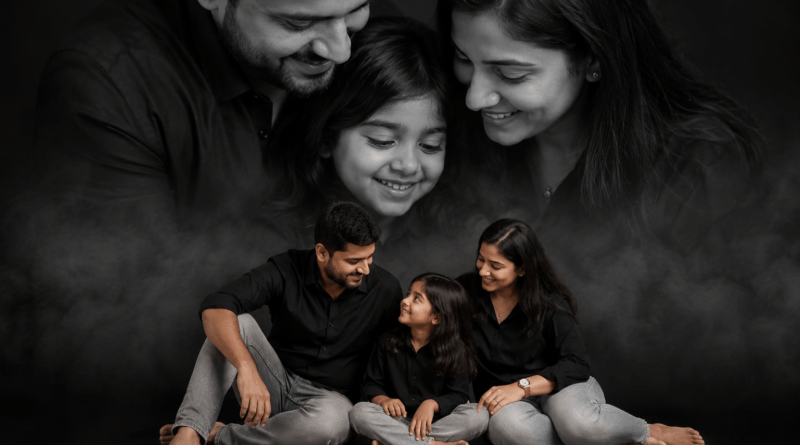
In this guide, we are sharing a premium, tested Midjourney v6 prompt that creates a breathtaking double-composition family portrait—combining high-contrast monochrome close-ups with warm, natural full-body studio shots in a single frame.
The Secret to Double-Composition AI Photography
Standard AI prompts usually generate a single group of people standing or sitting together. To create an editorial, magazine-cover look, this prompt utilizes a split-layout technique:
-
The Top Half: A dramatic, high-contrast black-and-white close-up focusing purely on parental love and emotional facial features.
-
The Bottom Half: A warm, full-body casual studio shot that showcases modern family fashion and relaxed bonding.
-
The Transition: A soft fog/smoke effect that seamlessly blends the two distinct compositions together, avoiding harsh lines.
By specifying the wardrobe (coordinated black outfits and light grey jeans), lighting (professional softbox), and camera mechanics (85mm lens at f/1.8), Midjourney delivers an ultra-sharp, professional retouch look.
How to Customize This Prompt
You can easily tweak this master prompt to generate different variations depending on your project needs:
-
Change the Family Size: If you want a family of four with two children, simply change
family of Three, featuring mother, father, young daughtertofamily of Four, featuring mother, father, a young son and a toddler daughter. -
Change the Clothing Theme: For a festive or traditional look, replace
coordinated black outfits and light grey jeanswithtraditional elegant ethnic silk clothing. -
Change Ethnicity: You can replace
Indian familywithEuro-American family,Hispanic family, or any other ethnicity to change the character profiles instantly.
Best Aspect Ratio for Studio Layouts
We highly recommend keeping the --ar 4:5 or --ar 2:3 aspect ratio parameters at the end of the prompt. Vertical framing is absolutely essential for double-composition layouts, as it gives Midjourney enough vertical canvas space to properly separate and blend the top and bottom portrait sections.
The Premium Creative Family Portrait Prompt
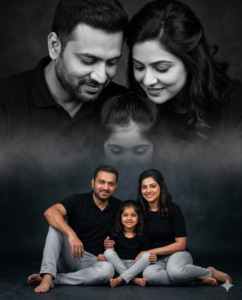
Here is the exact copy-and-paste prompt optimized for Midjourney and Leonardo AI.
Prompt to Copy: Ultra-realistic family studio portrait of an Indian family of Three, featuring mother, father, young daughter, in coordinated black outfits and light grey jeans, warm emotional expressions, cinematic photography style. Creative double-composition layout with a large black-and-white close-up portrait on the top half showing parents lovingly looking down at their children, while the bottom half features the full family sitting casually on the studio floor together. Soft fog/smoke effect blending between upper and lower compositions, dark moody studio background, professional softbox lighting, high contrast monochrome tones on top and natural warm tones on bottom, detailed facial features, genuine smiles, modern family fashion styling, symmetrical composition, shallow depth of field, luxury portrait photography, ultra-sharp focus, soft shadows, 85mm lens, f/1.8, editorial studio look, premium retouching, emotional family bonding atmosphere. –ar 4:5 –style raw